
For load balancing reasons a second device is needed in my setup and the BeagleBone Black makes a good candidate because of its built in eMMC flash memory.
Serial Console
The first thing we want to do is to connect a serial console. This makes live easier as the complete boot process can be seen (good for debug) and no network or connected periphery is needed to get to a console.
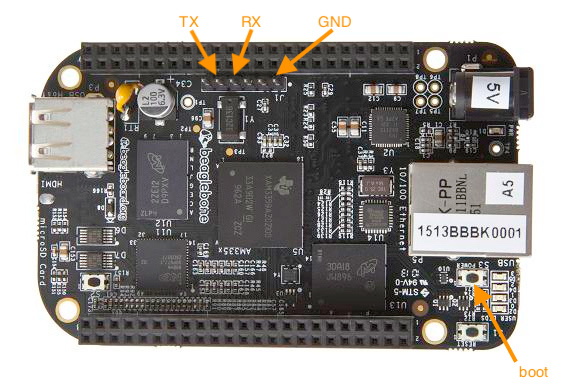
Booting from SD Card
We download the FreeBSD 13 release for the arm (arm7) architecture from the ftp site and put it onto an SD Card (use the dd tool or balenaEtcher). Getting the BeagleBone to boot from SD Card is done by pressing down onto the boot button when connecting power (see picture above).
Copying the image to eMMC Flash
As we have successfully booted from SD card we can log in with the pre-built username and password (root/root) and take a look at the block device partitions.
Note: the boot device dictates the order for block devices!
Because we booted from SD Card, the device mmcsd0 represents the SD card and mmcsd1 is the eMMC.
root@generic:~ # gpart show
=>      63  31586241  mmcsd0  MBR  (15G)
        63      2016          - free -  (1.0M)
      2079    102312       1  fat32lba  [active]  (50M)
    104391  31475769       2  freebsd  (15G)
  31580160      6144          - free -  (3.0M)

=>     63  7471041  mmcsd1  MBR  (3.6G)
       63  7471041          - free -  (3.6G)
Now we can use the dd tool to copy over the image (in my case I copied the image into the home directory of the freebsd user beforehand).
root@generic:~ # dd if=/home/freebsd/FreeBSD-13.0-RELEASE-arm-armv7-GENERICSD.img of=/dev/mmcsd1 bs=1M
3072+0 records in
3072+0 records out
3221225472 bytes transferred in 332.301124 secs (9693694 bytes/sec)
After the copy process is complete, we will see a changed layout of the eMMC flash memory.
root@generic:~ # gpart show mmcsd1
=>     63  7471041  mmcsd1  MBR  (3.6G)
       63     2016          - free -  (1.0M)
     2079   102312       1  fat32lba  [active]  (50M)
   104391  6187041       2  freebsd  (3.0G)
  6291432  1179672          - free -  (576M)
Booting from eMMC Flash
All there is left to do is to remove the SD Card and re-connect power to the BeagleBone. The first boot process will grow the root partition to fill the device. After logging into the console, the final flash layout will look as follows:
root@generic:~ # gpart show mmcsd0
=>     63  7471041  mmcsd0  MBR  (3.6G)
       63     2016          - free -  (1.0M)
     2079   102312       1  fat32lba  [active]  (50M)
   104391  7366713       2  freebsd  (3.5G)
Again, please note that the boot device dictates the numbering of block devices. Now our eMMC Flash is represented by the mmcsd0 device.